Documents and the Library
Matilda works on documents in a private workspace of her own: PDFs, Word, Excel, Google Docs and Sheets, scans and photos. Everything she makes or changes is kept in your Library.
What she can do
| Ask | For example |
|---|---|
| Draft | "Draft round 3 of the Ferro LOI." LOIs are built on your team's Word template and logo, so they redline cleanly. Terms she doesn't know are left as bracketed blanks. |
| Read and answer | "What's the rent escalation in this lease?" Scans are read too. |
| Redline and compare | "Redline their changes against our round 2." You get a tracked-changes copy under your name and a clean copy. |
| Edit in place | "Fix the typo in the LOI Google Doc." Comments and formatting stay. |
| Fill in and rework PDFs | "Fill in Northwind as tenant on page 2 and drop page 5." Merge, reorder and rotate pages too. |
| Redact | "Redact the guarantor's SSN." The words are removed, not covered. |
| Convert | "Turn this scan into a PDF." |
| Build a sheet | "Make a comps sheet from last quarter's lab deals." Excel models keep live formulas. |
| Offering memoranda | "Start an OM for Riverside Flats." More below |
Give her a file by attaching it in chat (from your computer, the Library or Drive), @mentioning it, sending it on WhatsApp or iMessage, or naming it: "the 400 Pine lease in Drive."
A file can be up to 25 MB, on any channel. She opens PDFs, Word, Excel, CSV, text files, Google Docs and Sheets, and photos; older formats (.doc, .xls, .rtf, HEIC and the like) open as converted copies. If a file doesn't open, she tells you why, with its size.
The Library
Open Library from the menu (hover the logo at the top left).
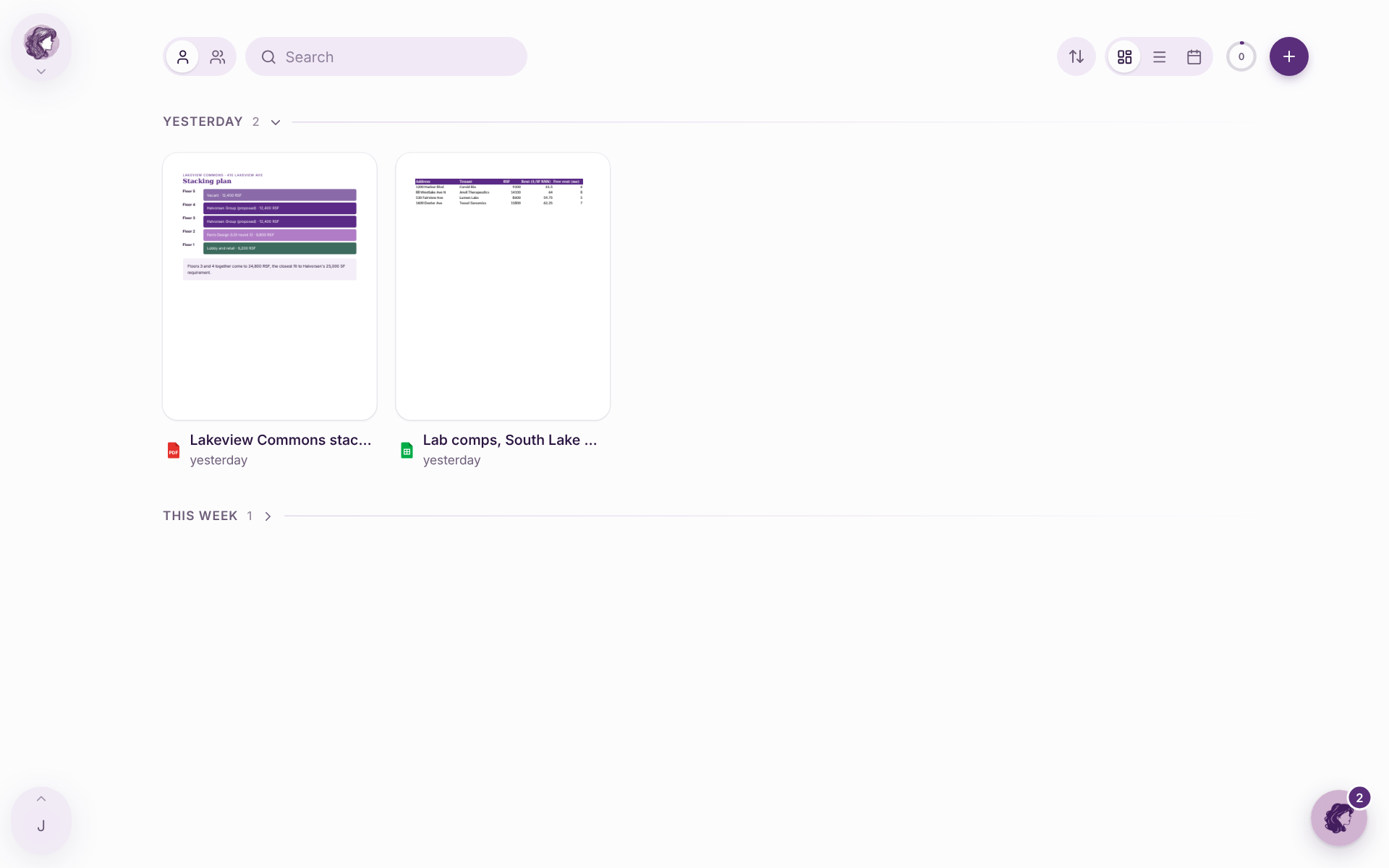
The toolbar, left to right:
| Control | What it does |
|---|---|
| Private / Team | Private is yours: files she made for you, Drive files she opened or changed, and emails she drafted. Team is what members shared. |
| Search | Finds by name. |
| Sort | Last modified, last opened, last created or title. |
| Grid / List / Calendar | The calendar shows every deadline she read from your documents. |
| Storage ring | How much of the workspace's storage is used. |
| + | Starts a blank document. |
- Days fold. Today is open; Yesterday, This week and older fold to a line. Click one to open it.
- Deadline chips on a card show the dates she read from that document. Click one to move it, mark it Done, or say Not a deadline.
- Ask about a file with the chat button on its card: Chat opens with the file attached.
- Share a file with the team from its menu, or ask: "share the comps sheet with the team."
A document's page
Click a card to see every page (the first 60 of a long file). From the menu: Download, Open as PDF, Rename, Share with the team or Delete. Text files can be edited right there and saved with ⌘ S.
Type in Ask Matilda under the document to change it. The new version replaces the old one in place. If the file isn't yours to edit, her changes go to a new private copy.
To undo a change, click Undo her change on the document's card in Chat, or ask her: "undo that."
Saving to Drive
- A Drive file she edits is saved as a new version of the same file, so Drive keeps the old one.
- A new file goes to My Drive or the folder you name. New Word, Excel and text files become Google Docs or Sheets, unless the format matters (LOIs, redlines and models stay Word or Excel).
- No duplicates. She updates the file she's working on instead of saving a second copy beside it, unless you ask for a separate copy. Found duplicates? "Clean up the duplicate LOIs" clears them under one yes.
- If someone changed the file since she opened it, she stops rather than overwrite their work. Ask her to open it again.
Offering memoranda
"Start an OM for Riverside Flats." She fills in your firm's OM layout over a few messages: the facts, up to four brokers, and pictures for the cover, the property, site plans and renderings. She lists what's still blank and asks for it, draws the location map from the address if you don't supply one, and sends the result as a PDF.
The layout, disclaimer and which pages are included are the firm's, set by an owner on Organization → Offering memorandum. Anyone can preview it there.
Each conversation's workspace has no internet access and is cleared three days after its last use. The Library keeps the files.